Deep dive into Delta Lake merge
If you are working with Delta Lake, one of the most popular frameworks for building large-scale data pipelines, you may have encountered the MERGE command. It is a powerful command that simplifies complex data processing tasks, but it can also be challenging to use efficiently. Additionally, it may not be immediately clear why you should use it instead of traditional methods like UPDATE and INSERT.
Therefore, in this article, I will explain how the Delta Lake MERGE command works under the hood and how to use it efficiently. By the end of this article, you will have a better understanding of the MERGE command and how to optimize its performance in your data pipelines.
This article is the second in Delta Lake deep dive series.
- Deep dive into Delta Lake merge (this article)
- Deep dive into Delta Lake Z-ordering
Why does merge matters?
Suppose you’re working on customer data for an online retail company. Your pipeline receives a stream of updates to customer information from various sources, such as CRM systems, web forms, and customer support interactions. Some records may need to be updated to existing customers, while others may represent new customers. Without MERGE, you would need to:
- Read the entire target table to find existing customers.
- Filter the incoming updates to identify new and existing customers.
- Perform separate UPDATE and INSERT operations for existing and new customers.
As a result, you would need to write a lot of code to perform these operations, and you would have to invest significant effort to ensure transactional integrity and prevent data corruption caused by concurrent pipelines writing to the same partition.
What is merge?
MERGE is a command in Delta Lake that performs insert, update, or delete operations based on the following conditions:
- whenMatched: when a source row matches a target row, perform the specified action on the source row
- whenNotMatched: when a source row does not match any target row, perform the specified action to the source row
- whenNotMatchedBySource: when a target row does not match any source row, perform the specified action on the target row
Another important aspect of MERGE is automatic schema evolution. It handles schema mismatches between the source and target tables by automatically evolving the schema.
The most common use case of MERGE is to perform an upsert operation. By combining the whenMatched and whenNotMatched clauses, you can execute an upsert in a single command.
-- Upsert operation using MERGE
MERGE INTO target
USING source
ON source.key = target.key
WHEN MATCHED
  UPDATE SET *
WHEN NOT MATCHED
  INSERT *
WHEN NOT MATCHED BY SOURCE
  DELETE
Another common use case is to implement a cdc (change data capture) pipeline. It combines detecting changes in the source table and performing delete, update, or insert operations on the target table in an atomic way.
-- CDC operation using MERGE
MERGE INTO users
USING (
  SELECT userId, latest.address AS address, latest.deleted AS deleted FROM (
    SELECT userId, MAX(struct(TIME, address, deleted)) AS latest
    FROM changes GROUP BY userId
  )
) latestChange
ON latestChange.userId = users.userId
WHEN MATCHED AND latestChange.deleted = TRUE THEN
  DELETE
WHEN MATCHED THEN
  UPDATE SET address = latestChange.address
WHEN NOT MATCHED AND latestChange.deleted = FALSE THEN
  INSERT (userId, address) VALUES (userId, address)
What’s inside?
MERGE consists of two distinct phases:
- Identifying the affected files (typically using an inner join)
- Applying the changes to those files (typically using a full outer join)
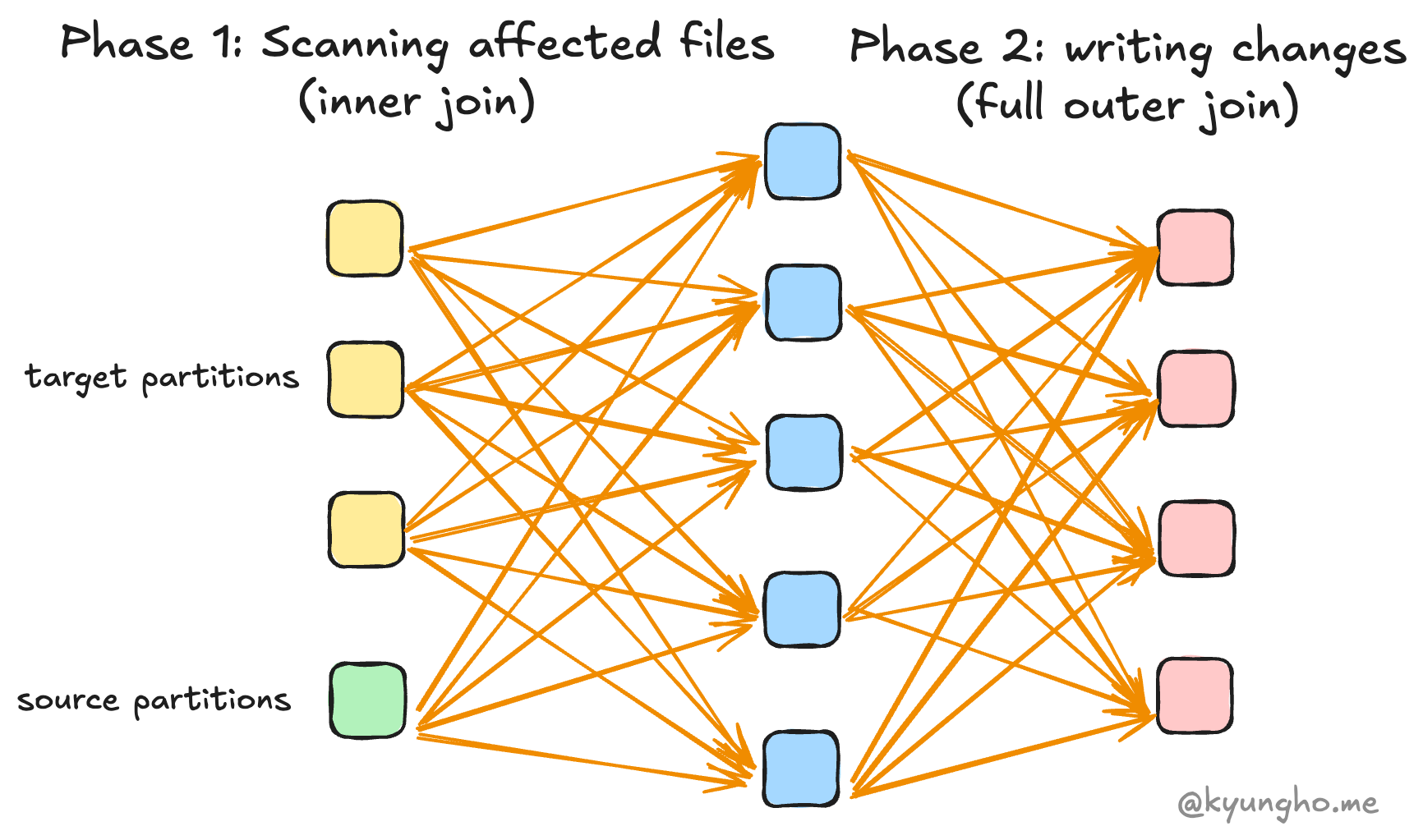
Phase 1: Identifying affected files
To identify the touched files, it performs an inner join using the given merge condition between the target and source tables to find matching records. Then it verifies that no source row matches multiple target rows. If this condition is violated, it throws an error. Finally, it identifies all files that contain matching records.
NOTE: The join type can be a right outer join if the
WHEN NOT MATCHED BY SOURCEclause is specified, which is used for deleting or updating the target rows that are not matched with the source rows.
Therefore, the performance of this phase is influenced by two factors: how efficiently the existing files are read and how efficiently the join is performed.
Read performance can be improved by:
- Merge predicates: Use merge predicates to reduce the search space. If your table uses Hive-style partitioning, include partition columns in the merge condition to take advantage of partition pruning.
- Compacting small files: The small file problem degrades read I/O performance. Compact small files to improve performance.
- Z-ordering: Z-order is a technique to improve the locality of records, enabling data skipping. It also uses a bin-packing algorithm under the hood, which can significantly improve read performance.
Join performance can be improved by:
- The number of partitions: The number of partitions configured by
spark.sql.shuffle.partitionsis relevant to the order of parallelism and the number of output partitions. Properly configured the number of partitions can improve the join performance. - Broadcast join: If you have enough memory for each executor, you can increase the broadcast join threshold by setting
spark.sql.autoBroadcastJoinThresholdto a larger value to use broadcast join, which can significantly improve the join performance.
Phase 2: Applying Changes
In the second phase, Delta Lake reads the affected files identified in the first phase and applies the necessary changes. The way Delta Lake combines the source and target data depends on the specific clauses used in your MERGE statement. This is typically achieved through a join operation, but the type of join can vary:
| MERGE Clauses Present | Join Type Used | Typical Use Case |
|---|---|---|
| WHEN MATCHED | Inner Join | Update/Delete only |
| WHEN NOT MATCHED | Right Outer Join | Insert only |
| WHEN MATCHED + WHEN NOT MATCHED | Left Outer Join | Upsert (update/insert) |
| All three (including NOT MATCHED BY SOURCE) | Full Outer Join | Upsert + Delete (CDC) |
After performing the join, it applies the changes to the files. Therefore, performance is affected by both the efficiency of the join and the efficiency of writing the files.
Join performance can be improved by:
- The number of partitions: The number of partitions configured by
spark.sql.shuffle.partitionsis relevant to the order of parallelism and the number of output partitions. Properly configured the number of partitions can improve the join performance. - Cache the source table: If the source table is stored in a caching layer such as memory, it improves the join performance by using the cached data directly. Note that you should not cache the target table since it will cause cache coherence problems.
Write performance can be improved by:
- Optimized write: The number of output files affects the write performance. Without optimized write, the number of output files is either the same as the number of partitions (which is commonly large, by default 200) or a small number of files if AQE (Adaptive Query Execution) is enabled. This can lead to poor write performance, as it may result in each file being excessively large. Optimized write efficiently manages the number of output files by repartitioning the data before writing. The number of output files is determined by the size of the data, which is configured by
spark.databricks.delta.optimizeWrite.binSize. - repartitionBeforeWrite: Alternatively, you can set
spark.delta.merge.repartitionBeforeWriteto true to repartition the data by the table’s partition columns before writing. This is unnecessary if you have already enabled optimized write, and there is generally no reason to use it instead of optimized write.
Automatic schema evolution
If the schema of the Delta table is different from the source, INSERT and UPDATE operations will fail with an error. This is where automatic schema evolution comes in. It automatically evolves the schema of the target table to match the source table by adding new columns or updating existing columns as needed.
It physically changes the metadata of parquet files. Note that it updates the metadata of files only if the target file includes modified records. If an existing file has no modified records, it remains unchanged, and its metadata will be updated only when the file is modified by future DML operations.
Additional Tips
Merge does not break Hive-style partitioning
A Hive-style partition is a common way to organize data in Delta Lake. You do not need to worry about MERGE breaking the existing partition structure. It is designed to work seamlessly with Hive-style partitioning.
- It creates new directories if the partition does not exist.
- It does not break updating existing partitions.
- Partition pruning is effective to reduce the search space.
Low shuffle merge
NOTE: Only available in Databricks Runtime 10.4 LTS and above.
Suppose there are only a small number of records to be updated in a large file. In this case, MERGE still reads the entire file and replaces it with a new file, causing unnecessary rows to be shuffled and written. If you are using Databricks, low shuffle merge can help you avoid this problem. It can be enabled by setting spark.databricks.delta.merge.enableLowShuffle to true.
It works by passing only the modified rows to the shuffle stages, which significantly reduces the amount of data shuffled and written. It also attempts to preserve the existing data layout of unmodified records, including z-order optimization.